
Forms and XFA Tab
What it shows
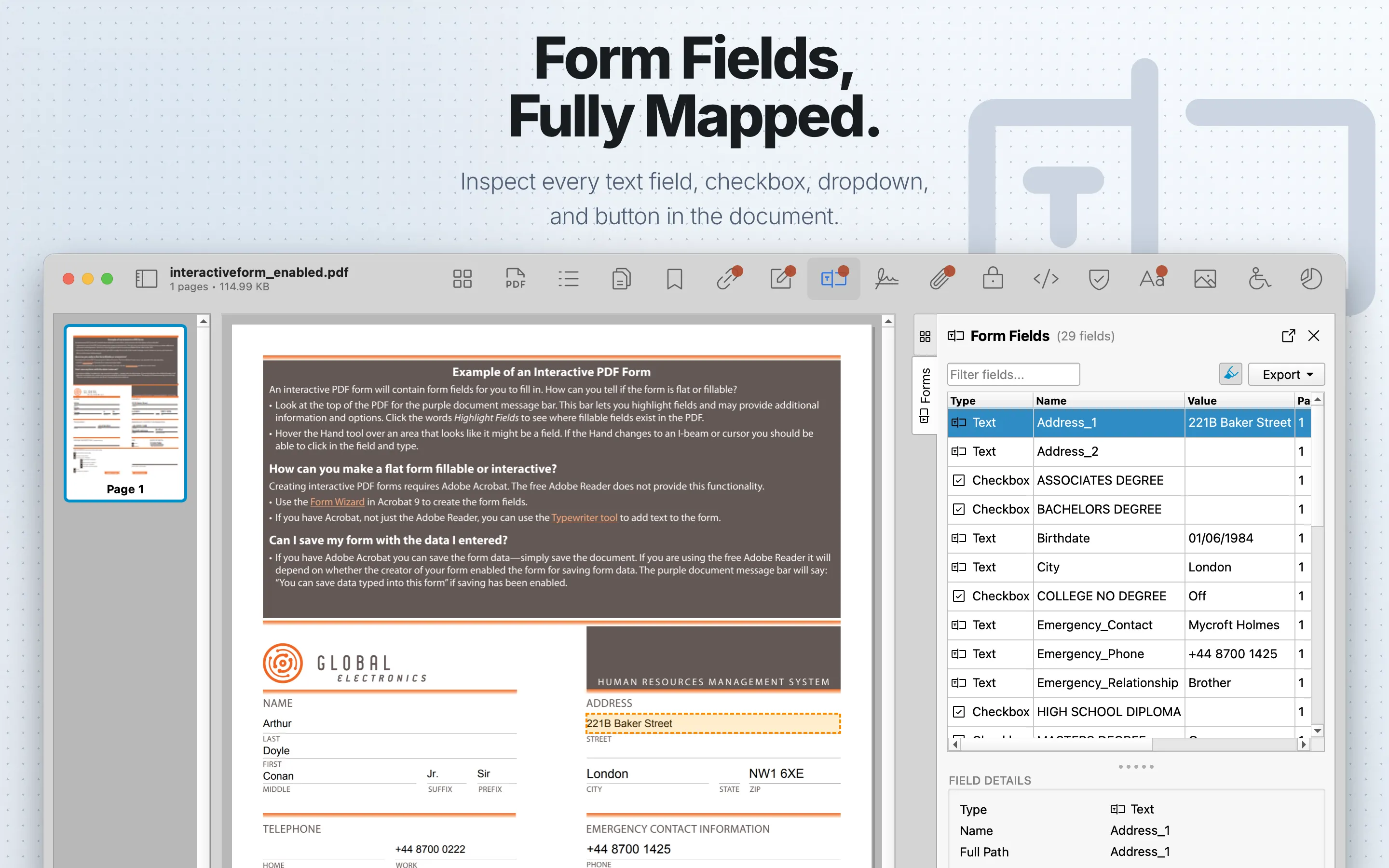
Forms and XFA shows interactive AcroForm fields and XFA form packets when present. If a PDF contains both, the tab shows AcroForm and XFA as separate segments; if only one form type is present, PDF Auditor opens the relevant view directly.
When to use it
Use it for form QA, data collection workflows, and reviewing legacy XFA documents.
AcroForm Table
| Column | What it means |
|---|---|
| Type | The form field type, such as text, checkbox, radio, dropdown, list, signature, or button. |
| Name | The field name shown by the PDF. Hover for the full field path. |
| Value | The current field value. |
| Page | The page where the field appears when available. |
| Required | Whether the field is marked required. |
| Read Only | Whether the field is marked read-only. |
| Parent | The parent field name when the field is part of a field hierarchy. |
XFA Tables
XFA Packets:
| Column | What it means |
|---|---|
| Packet | The XFA packet name, such as template, datasets, config, or form. |
| Description | A short explanation of what the packet normally contains. |
| Size | The packet size. |
XFA values:
| Column | What it means |
|---|---|
| Field | The flattened XFA data path. |
| Value | The filled value found at that path. |
Review steps
- Review field names, types, values, defaults, and page locations.
- Check for actions, calculations, submit behavior, and hidden fields.
- Inspect XFA content when a file uses legacy form structures.
- Cross-check related JavaScript and Annotations .
AcroForm fields
Use the filter field to search form fields. Select a row to open Field Details, which shows Type, Name, Full Path, Page, Export Enabled, Required, Read Only, Value, and field-type-specific properties such as Max Length, Default Value, Multiline, Combed, Password, Checked, On Value, States, Radio Group, signature metadata, Combobox, Multi-select, Editable, and Options.
When highlighting is enabled, selecting a field highlights its rectangle in the PDF preview. Signature fields include a View in Signatures Tab button.
XFA form
The XFA view lists XFA Packets with packet name, description, and size. It also lists filled dataset values in a Field/Value table with filtering.
Use Save XML… to save the selected XFA packet. Use Save All as .xdp… to save the full XFA package. XFA field values can be exported as CSV or JSON.
PDF Auditor shows an XFA status note for dynamic XFA forms because some viewers cannot render XFA; Acrobat is the canonical renderer.
Export
AcroForm fields can export table data as CSV or JSON. XFA form values can export as CSV or JSON under the xfa_form_values export. Export requires PDF Auditor Pro.