
Accessibility Tab
What it shows
Accessibility shows the PDF tag structure as a tree, including tag names, pages, bounding boxes where available, and related tag attributes.
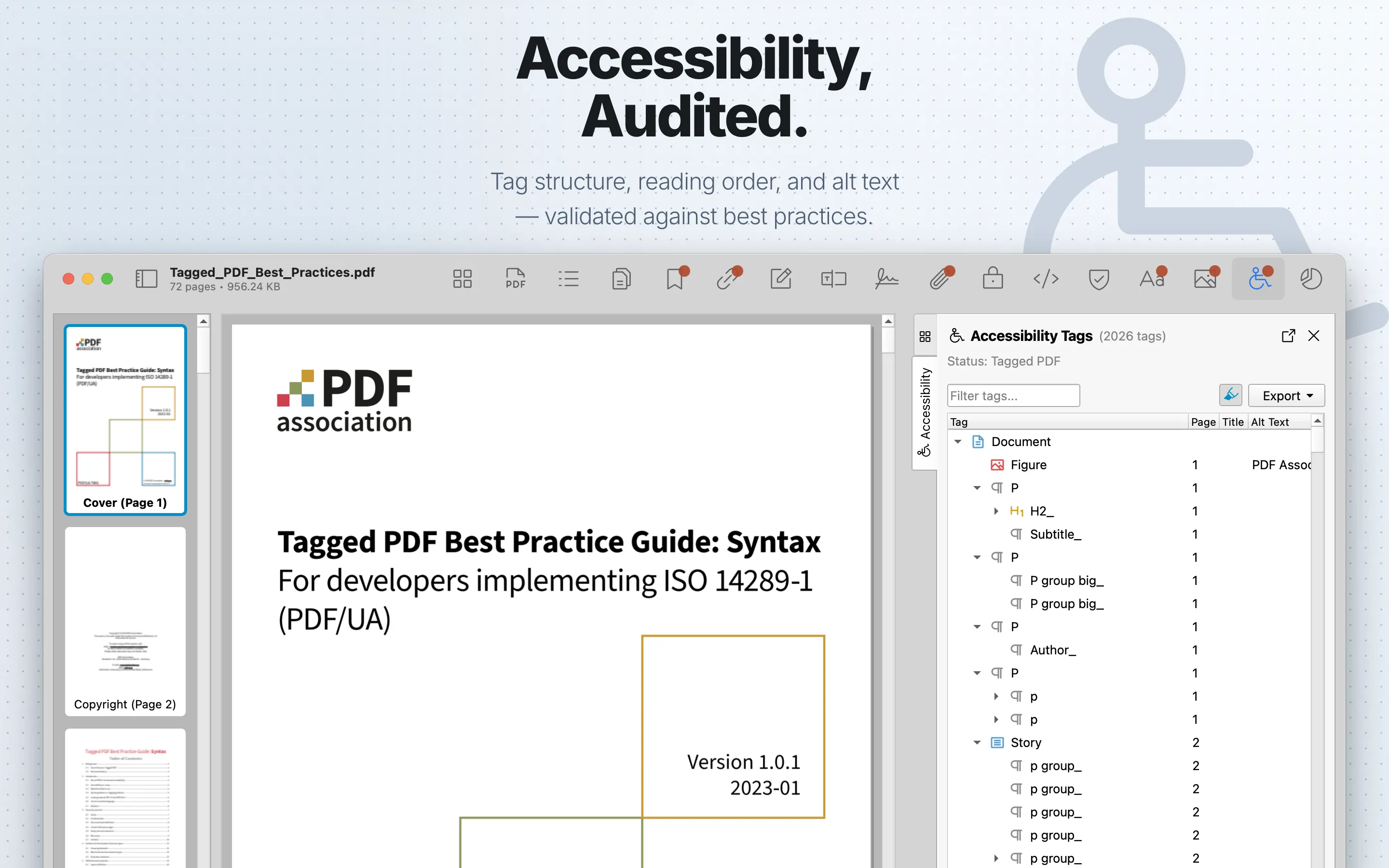
When to use it
Use it when reviewing tagged PDFs, assistive-technology support, and publishing requirements.
Accessibility Table
| Column | What it means |
|---|---|
| Tag | The PDF structure tag type, such as document, section, paragraph, heading, table, figure, or artifact-related tags. |
| Page | The related page when the tag maps to page content. |
| Title | The tag title attribute when present. |
| Alt Text | Alternative text associated with the tag, commonly used for figures or non-text content. |
| Lang | The language attribute on the tag when defined. |
Review steps
- Confirm whether the PDF contains a tag structure.
- Review tag hierarchy and attributes for the pages or content areas that matter most.
- Compare structure with the visible reading order in the preview.
- Treat missing, shallow, or confusing tags as a reason for a deeper accessibility review.
Details
Use the filter field to search tags. Select a tag to open Tag Info with available attributes and structure details. When bounding information is available and highlighting is enabled, selecting a tag highlights the corresponding content in the PDF preview.
Export
Accessibility can export tag data as CSV or JSON. Export requires PDF Auditor Pro.