Interface Overview
PDF Auditor combines a PDF preview with a set of inspection tabs. Select a tab to review a specific class of document data.
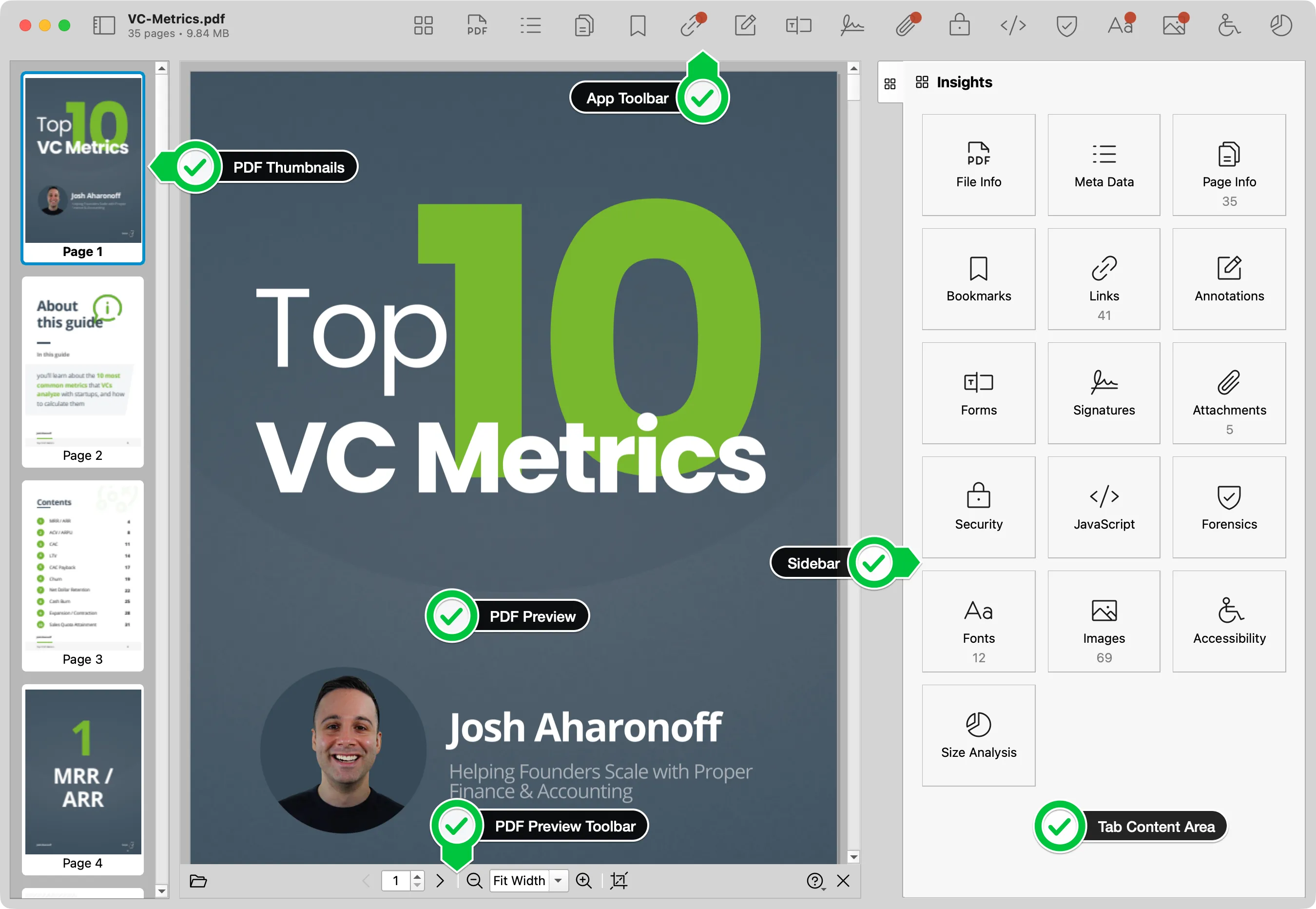
Main areas
| Area | What it does |
|---|---|
| PDF preview | Shows visible pages and highlighted findings. |
| PDF toolbar | Controls opening, page navigation, zoom, page geometry, help, and closing the current PDF. |
| PDF Thumbnails | Shows page thumbnails on the left for quick visual navigation. |
| Sidebar | Shows the currently active inspection tab, such as File Info, Metadata, Security, Pages, and Forensics. |
| Tab content | Shows tables, reports, filters, actions, and exports for the selected inspector. |
| App Toolbar | Keeps common app actions available from the top of the window including available tabs. |
Working with findings
Select the relevant option from the toolbar above or in the Insights tab. Tabs with detected items have a red bubble.
Use the Insights tab when you need to return to the broad inspection overview. Use tab history and keyboard shortcuts when moving repeatedly between related inspectors.